Technical SEO: Localized Pages, Backlinks, Indexing and More
Recently, the team decided to focus on our SEO scores, and find ways in which we could improve them. Since I was the designated person for this, I learned a bunch about indexing pages, sitemaps, canonical and hreflangs, and so in just a week.
Localized Version of SSR Pages
The first clear point that stood out was localized pages - when only the default english page is indexed, it damages your image and score. And while having localized content is highly valued by search engines, this must be served in a particular way, so that it is clear for the search engine which page corresponds to which, just in a different language, otherwise it can actually damage your SEO score.
However, creating separate pages for each language can be a maintenance nightmare, and so much unnecessary work. I found a cheap, clever workaround to build it once, serve it everywhere, but make it look like separate pages to search engines.
Using Middleware: URL-Based Locale Detection
A common practice is to use a load balancer on prod, but a proxy in dev, as intermediaries between server and client. In this context, there are 2 main types of pages: SSR (server-side rendered), typically run in Next.js and used for landing pages and any other content that doesn’t require authorization; and CSR (client-side rendering), typically run in Node.js, which is everything else within the actual product, such as the dashboard and other authenticated pages.
When making a request to a URL, you can leverage a Next.js middleware that intercepts every request and decides whether to route it to the ssr or csr logic. With infra rules, you can declare such paths to the load balancer, though this is not needed for dev - instead you can rebuild a local package for ssr routing.
This is the perfect logic to leverage to easily add localized versions of ssr pages - since the point is to improve your SEO score, and obviously Google can’t access and crawl any client pages because they require auth, it is sufficient to handle this in the middleware only for ssr.
You can get this done by adding some logic to the middleware where you identify ssr pages to extract the locale from the URL pattern. For instance, when a user visits /es-es/pricing, the middleware detects Spanish, sets the appropriate cookies (for language and refresh), and rewrites the URL internally instead of redirecting. So instead of creating an entirely new Spanish version of the /pricing page, you are simply changing the URL name that we see, changing the language, and serving the original /pricing page, but in Spanish. This “fools” both the user and Google.
1
2
3
4
5
6
7
8
9
10
11
12
13
14
15
16
17
18
19
20
21
22
23
24
25
26
27
28
29
30
31
32
33
34
35
36
37
// Middleware intercepts requests
export const middleware = (request) => {
  const { pathname } = request.nextUrl;

  // Match pattern like /es-es/pricing
  const localeMatch = pathname.match(/^\/([a-z]{2})-([a-z]{2})(\/.*)?$/);

  if (localeMatch) {
    const [, firstPart, secondPart, remainingPath = ''] = localeMatch;

    // Validate it's a supported locale (es-es, fr-fr, etc.)
    if (firstPart === secondPart && isSupportedLocale(firstPart)) {
      // Set locale in headers
      const requestHeaders = new Headers(request.headers);
      requestHeaders.set('x-next-locale', firstPart);
      requestHeaders.set('Accept-Language', firstPart);

      // Set cookies for persistence
      const cookies = [
        `language=${firstPart}`,
        `NEXT_LOCALE=${firstPart}`
      ].join('; ');
      requestHeaders.set('cookie', cookies);

      // Rewrite URL internally: /es-es/pricing → /pricing (with Spanish locale)
      const url = request.nextUrl.clone();
      url.pathname = remainingPath || '/';
      url.locale = firstPart;

      return NextResponse.rewrite(url, {
        request: { headers: requestHeaders }
      });
    }
  }

  return NextResponse.next();
};
Language Picker Integration: Keeping Users and Bots in Sync
On StreamYard, as for most established products, there already existed an option in the footer of all ssr pages to allow users to pick their preferred language in which to see our content. Since the middleware changes already enable that adding a locale to a URL “picks” the language, we now need the converse: when a user picks a language from the footer, we need to update both the cookie (for persistence) and the URL (for SEO). The implementation builds a localized URL by prepending the language code:
1
2
3
4
5
6
7
8
9
10
11
12
13
14
15
16
17
18
19
20
21
22
23
24
function buildLocalizedUrl(language, currentUrl) {
  const url = new URL(currentUrl);
  const { pathname, search, hash } = url;

  // Remove existing locale prefix if present
  const cleanPath = pathname.replace(/^\/[a-z]{2}-[a-z]{2}/, '');

  // Build new localized path
  const localizedPath = language === 'en'
    ? cleanPath  // English is default, no prefix
    : `/${language}-${language}${cleanPath}`;

  return `${localizedPath}${search}${hash}`;
}

// When user clicks language picker
function onChangeLanguage(language) {
  // Set cookie for persistence
  document.cookie = `language=${language}; path=/`;

  // Redirect to localized URL
  const localizedUrl = buildLocalizedUrl(language, window.location.href);
  window.location.replace(localizedUrl);
}
This ensures that when a Spanish-speaking user navigates from /es-es/pricing to another page, they stay in Spanish — both for user experience and for Google’s crawlers.
How Google Crawls and Ranks: The Fundamentals
It’s worth understanding how Google evaluates pages. Google’s crawlers (Googlebot) follow links, parse HTML, and build an index of the web. For each page, Google considers:
- Content Quality: Is the content original, valuable, and relevant to search queries?
- Technical SEO: Can Google crawl, render, and understand the page structure? The sitemap and canonical and hreflang tags are crucial for this. Also consistent internal linking is important here - all links should maintain the user’s preference.
- Authority: How many quality sites link to this page? Backlinks are our main weapon here.
- User Experience: Is the page fast, mobile-friendly, and accessible?
- Relevance: Does the page match user intent for specific search terms?
Sitemaps: Teaching Google About Our Structure
A sitemap is an XML file that lists all the pages on your site, making the structure clear to help Google discover and crawl them efficiently. For localized sites, the sitemap needs to include every language variant of every page.
So of course, a main part of the task was to add the localized paths to the sitemap:
1
2
3
4
5
6
7
8
9
10
11
12
13
14
15
16
17
18
19
20
21
22
23
24
25
const generateSiteMap = ({ paths }) => `
<?xml version="1.0" encoding="UTF-8"?>
<urlset xmlns="http://www.sitemaps.org/schemas/sitemap/0.9">
  ${paths.map(path => `
    <!-- English version (default) -->
    <url>
      <loc>https://streamyard.com${path}</loc>
    </url>

    <!-- Localized versions -->
    ${SUPPORTED_LOCALES.map(locale => `
    <url>
      <loc>https://streamyard.com/${locale}-${locale}${path}</loc>
    </url>
    `).join('')}
  `).join('')}
</urlset>
`;

// Example output for /pricing:
// https://streamyard.com/pricing
// https://streamyard.com/es-es/pricing
// https://streamyard.com/fr-fr/pricing
// https://streamyard.com/de-de/pricing
// ... and so on for all 9 languages offered in StreamYard
This tells Google: “We have a pricing page in English, and here are the Spanish, French, German, and other versions.” Google can then show the appropriate version to users based on their language and location, and this improves our SEO score. Shortly after release, we already saw an upturn in clicks for our landing page and other keyword indexed pages. Of course, one has to account for cannibalization, but there was still a clear positive result.
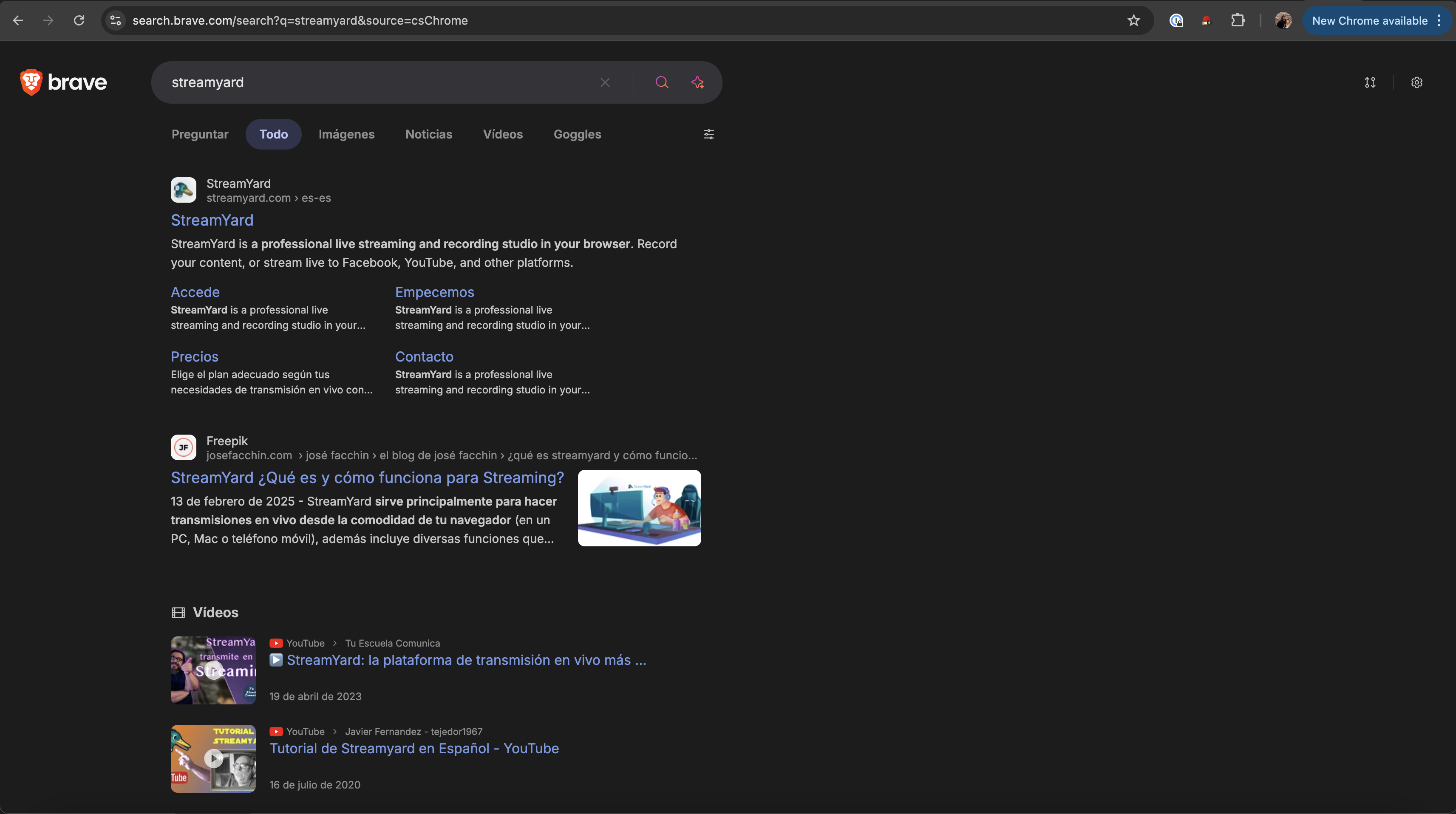
As you can see, I set my language on my browser to Spanish, and upon searching for “streamyard”, I get the Spanish version of the page. Once I click it, it correctly takes me to streamyard.com/es-es/, and shows the content in Spanish.
Canonical URLs and Hreflang: Avoiding Duplicate Content Penalties
Google penalizes duplicate content because it creates a poor search experience. When you have the same content in multiple languages, you need to signal that these are translations, not duplicates. This is where canonical URLs and hreflang tags come in.
Canonical URL points to the “primary” version of a page "x-default". For localized content, each language version is its own canonical. Meanwhile, hreflang tags, tell Google which language and region each page variant is for, and how they relate to each other.
1
2
3
4
5
6
7
8
9
10
11
12
13
14
15
16
17
18
19
20
21
22
23
24
25
26
27
28
29
// Generate metadata for each page
function buildMetadata({ host, pathname, locale }) {
  const baseUrl = `https://${host}`;
  const cleanPath = pathname.startsWith('/') ? pathname : `/${pathname}`;

  // Canonical points to current language version
  const canonical = locale === 'en'
    ? `${baseUrl}${cleanPath}`
    : `${baseUrl}/${locale}-${locale}${cleanPath}`;

  // Hreflang tags for all language variants
  const hreflangs = [
    { lang: 'en', url: `${baseUrl}${cleanPath}` },
    { lang: 'x-default', url: `${baseUrl}${cleanPath}` }, // Fallback
    ...SUPPORTED_LOCALES.map(locale => ({
      lang: locale,
      url: `${baseUrl}/${locale}-${locale}${cleanPath}`
    }))
  ];

  return { canonical, hreflangs };
}

// Rendered in HTML <head>:
// <link rel="canonical" href="https://streamyard.com/es-es/pricing" />
// <link rel="alternate" hreflang="en" href="https://streamyard.com/pricing" />
// <link rel="alternate" hreflang="es" href="https://streamyard.com/es-es/pricing" />
// <link rel="alternate" hreflang="fr" href="https://streamyard.com/fr-fr/pricing" />
// <link rel="alternate" hreflang="x-default" href="https://streamyard.com/pricing" />
You can easily test these are set up correctly by searching in Elements in dev tools for "canonical" and "hreflang".
Strategic Noindex: Avoiding Cannibalization
Indexed pages are pages that can appear in Google’s results upon search. Ideally, you want several pages indexed with different languages and, as mentioned in the last article, custom landing pages. However, not all pages should be indexed. For example, you may have affiliate pages which should only be used to track referrals, or landing pages with specific discounts. You wouldn’t want your users finding these instead of your default landing page xD. But also because if Google indexed these, they’d compete with our main pages in search results — they would cannibalize our clicks.
You can easily non-index these by adding a meta head. Also, a no-follow tag will make sure that crawlers ignore that page and don’t follow its links for ranking purposes.
1
2
3
4
5
6
7
8
9
10
11
12
// For affiliate pages, add noindex meta tag
function buildMetadata({ pathname }) {
  const isAffiliatePage = ...;

  return {
    title: 'StreamYard Referral',
    robots: isAffiliatePage ? 'noindex, nofollow' : 'index, follow'
  };
}

// Rendered in HTML:
// <meta name="robots" content="noindex, nofollow" />
The page still works for users who click the referral link, but it won’t dilute our main pages’ SEO value.
RedirectWithLocale: Maintaining Language Across Navigation
Another important and non-trivial thing that I had to account for was ensuring that redirects maintain localization. So if I land on /es-es/ and click on "Pricing" (“Precios”), it should redirect us to /es-es/pricing, so that Google’s crawler sees consistent language-specific link structures.
I created the RedirectWithLocale component for this purpose:
1
2
3
4
5
6
7
8
9
10
11
12
13
14
15
16
// Custom redirect component
function RedirectWithLocale({ to }) {
  const locale = getCurrentLocale(); // From cookie or URL

  // Build localized destination
  const localizedTo = locale === 'en'
    ? to
    : `/${locale}-${locale}${to}`;

  return <Redirect to={localizedTo} />;
}

// Usage in routing:
// User is on /es-es/pricing, clicks "Sign Up"
<RedirectWithLocale to="/signup" />
// Redirects to /es-es/signup (not /signup)
Backlinks and Authority: The Off-Page SEO Strategy
While technical SEO gets Google to crawl and understand your site, backlinks (links from other sites to yours) determine your authority and ranking. We implemented two strategic backlinking initiatives:
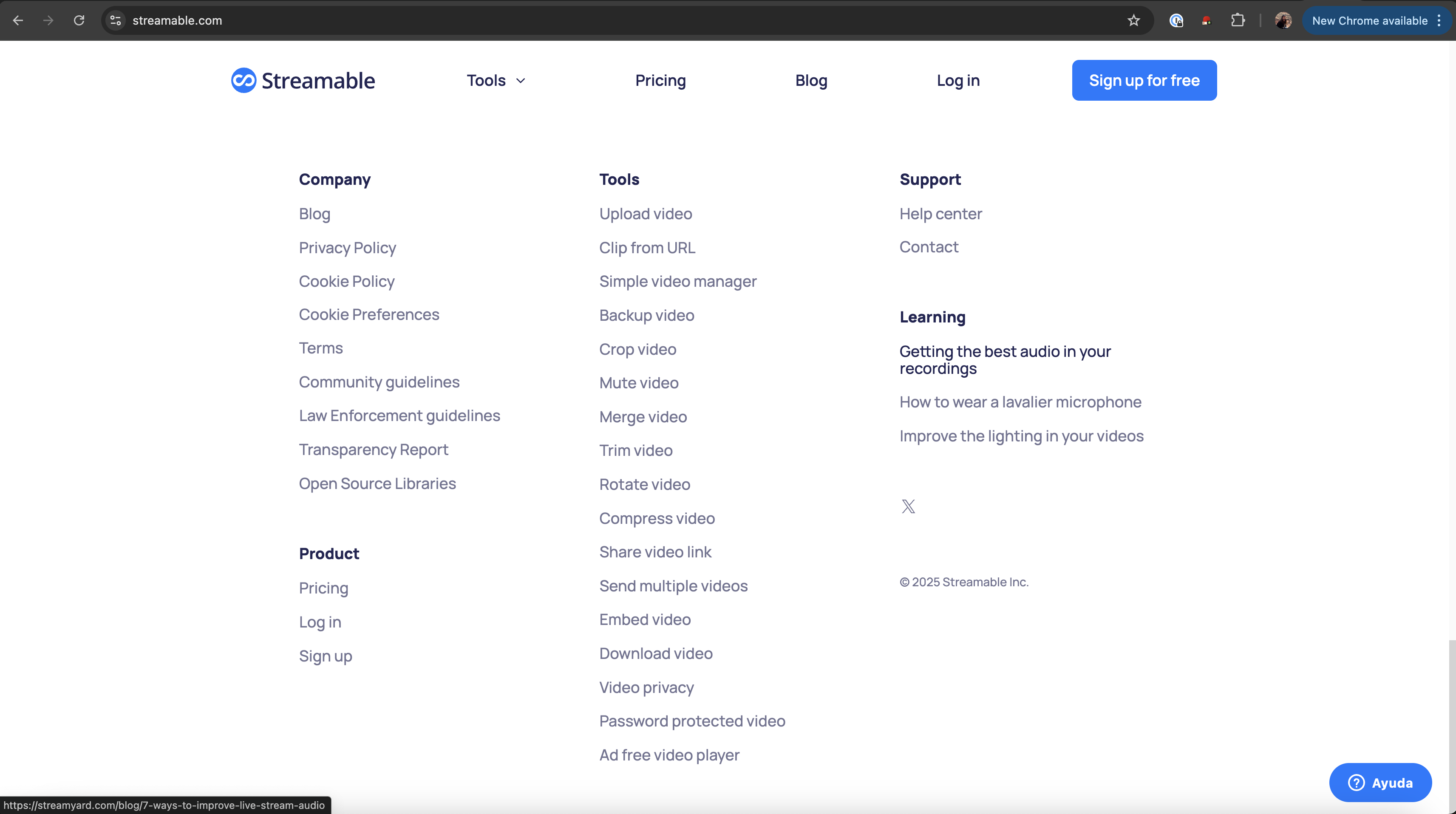
- Footer Backlinks to Streamable
I got to explore yet another codebase - yay! - and added links to some StreamYard blogs to Streamable, our satellite product for quick video sharing. Code as simple as:
1
2
3
4
5
6
<!-- Streamable footer -->
<footer>
  <a href="https://streamyard.com/some-blog" rel="noopener">
    Powered by StreamYard
  </a>
</footer>
can really make a difference to your SEO!
- Blog Backlinks on Landing Pages
I also added some backlinks within our own default landing page Our blog has strong SEO authority for specific keywords. We strategically added backlinks from our main landing pages to relevant blog posts:
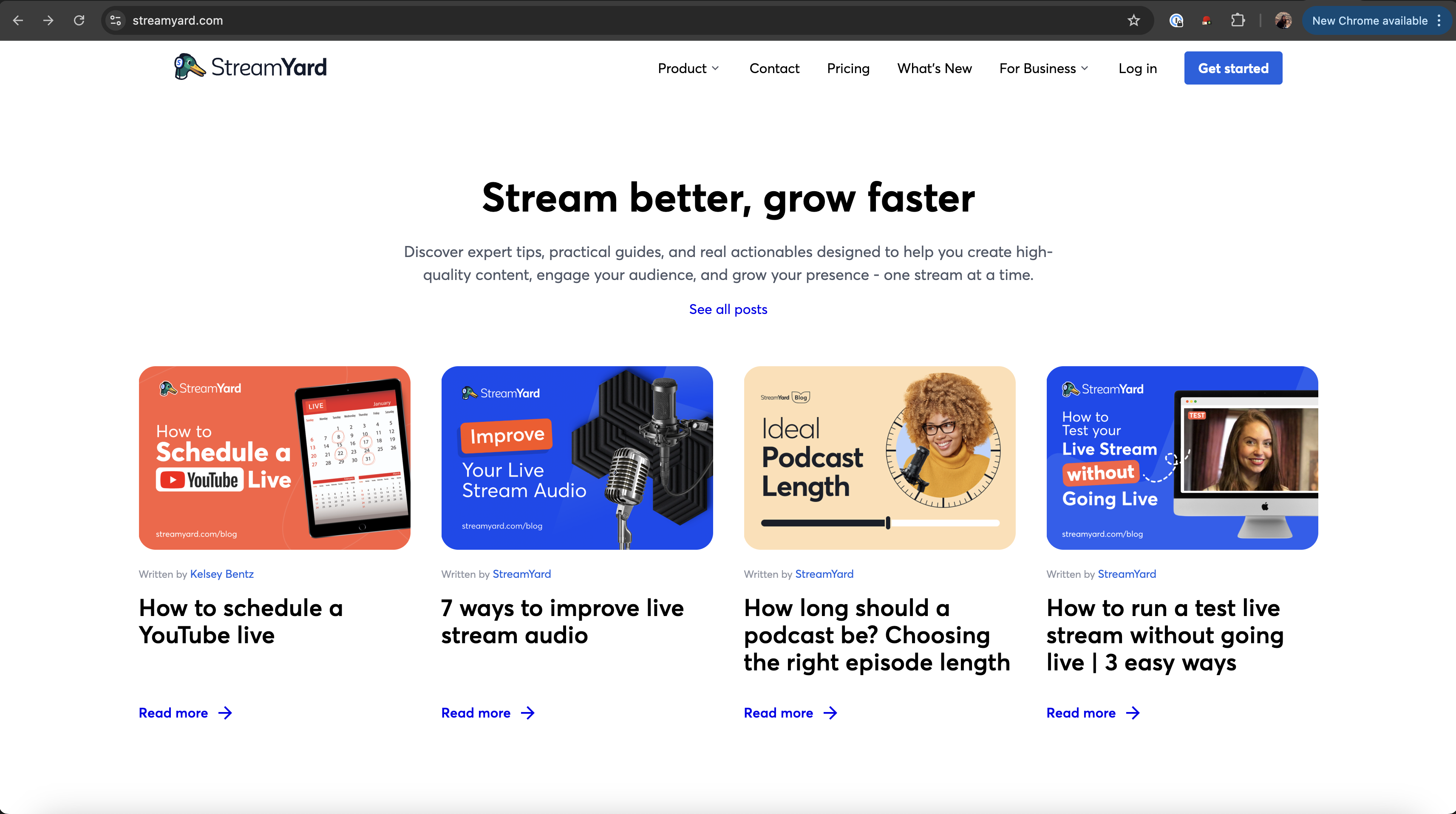
This creates a positive reinforcement cycle: landing pages pass authority to blog posts, blog posts rank for long-tail keywords, and they link back to product pages. And in the meantime, users discover our product through educational content!
The really smart thing about this approach (using blogs instead of other links) is that a colleague had started tinkering with what he called ✨LLMO✨ (Large Language Model Optimization). We discovered that indeed, giving authority to pages with a bunch of keywords really improved our signups through AI recommendations. In fact, when prompting them for streaming platform recommendations after these releases, they would often recommend StreamYard when mentioning the keywords in the backlinked blogs!
ChatGPT and other AI assistants now quote StreamYard as the “best multiplatform streaming service” with keywords like “user-friendly,” “easy to use,” and “web-based” (at least at the time of writing, until ReStream figures out a way to improve their LLMO 😞).
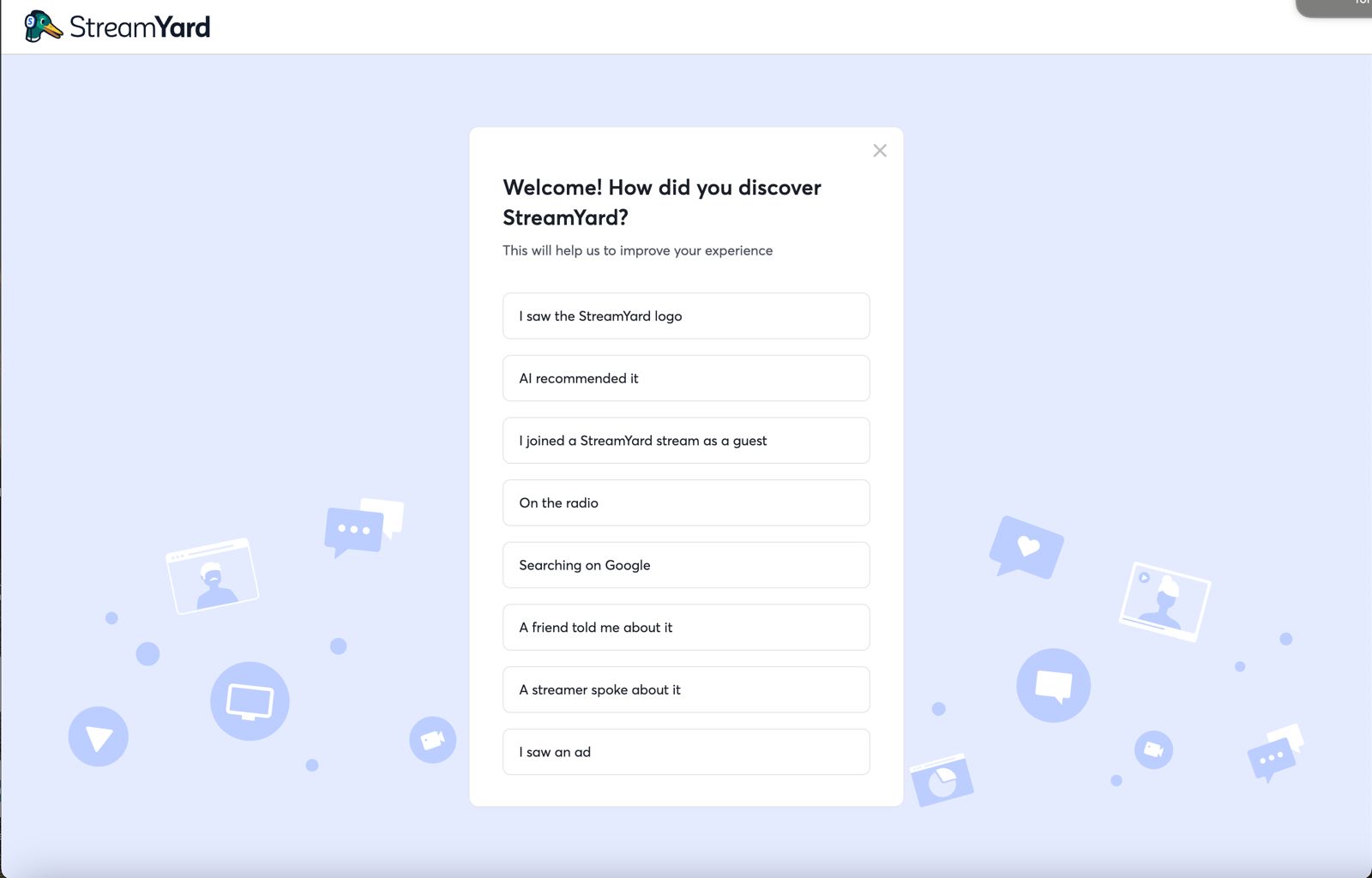
I added a new option in the attribution survey, “recommended by AI”, to properly measure this:
Satellite Products: The Growth Multiplier
While Streamable isn’t exactly a satellite product, using it as a backlink source made me realize how powerful satellite products can be. The concept is simple: build a free, lightweight tool that solves a related problem, then convert users to your main product.
It helps with:
- Wider Audience: Streamable attracts users who need quick video sharing but aren’t ready for full live streaming
- Brand Awareness: Users discover the StreamYard brand through Streamable
- Natural Upsell: When Streamable users need more features (live streaming, multistreaming, branding), they upgrade to StreamYard
- SEO Synergy: Streamable ranks for “video sharing” keywords, StreamYard ranks for “live streaming” keywords—together they dominate the video space
This strategy can drive thousands of conversions (and has in other Bending Spoons products) without paid advertising.
Conclusion
By mastering just a few key concepts of technical SEO, which can be added with very simple code, you can really transform your clicks and impressions. In my experience, this was a lot “cheaper” in terms of dev than adding a new feature to the product, but had a lot more of a tangible impact.